


Adding address validation to Replit apps with our ready-to-use prompt
Replit is having a notable year. Agent 4 launched in March, the company raised $400 million at a $9 billion valuation, and there are now more than 50 million people building on the platform. Google Cloud also named Replit its 2026 AI Tooling Partner of the Year, which shows how quickly the platform has grown into the wider ecosystem.
We have been spending time with the new wave of AI app builders to understand where they fit for our customers, and Replit was always going to be one we looked at properly given how active the platform has become.
Ideal Postcodes Replit Address Finder Prompt
AI app builders make it easy to ship a form. They do not, on their own, make it easy to ship a form that captures clean data. A free-text address field will accept misspellings, missing post towns, invalid postcodes, and the occasional row of nonsense. None of that is obvious until the orders start going out or the records reach a reporting tool. Someone, eventually, has to cleanse the data before it can be used properly, and that work grows the longer it is left. Getting the data layer right early is far easier than trying to fix it once thousands of records are already in the system.
Accurate address data also supports work that goes beyond delivery. As we wrote about in our piece on the Data (Use and Access) Bill, addresses are a foundational piece of identity verification and compliance, not just a logistical detail.
Ideal Postcodes Bolt44 Address Finder Prompt
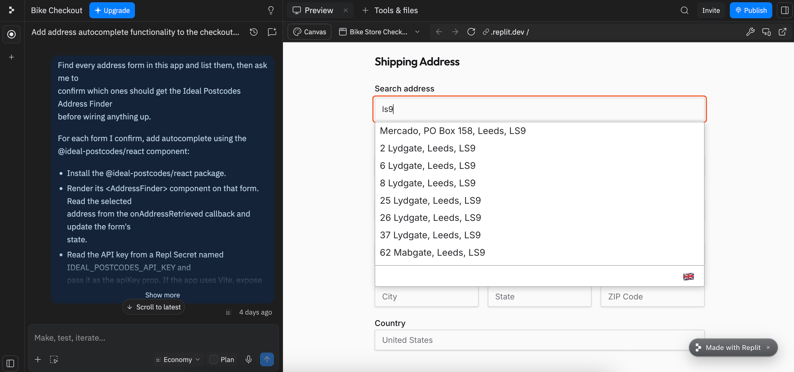
When an AI agent builds a form for you, it will happily accept whatever a user types into it. That is fine while you are testing an idea, and it becomes a problem the moment real customers start using the app. We have put together a ready-to-use prompt that adds the Address Finder to a Replit app in minutes.
You paste it into the agent chat with your API key, and the agent takes care of the rest. It finds the address forms in your app, asks you to confirm which ones should be updated, stores your key safely inside Replit rather than leaving it sitting in the code, and wires the component in so verified address lookup works on every form you have chosen.
Get Started
If you have a Base44 app on the go, the Replit integration documentation is the next step.
-
Sign up for a free trial to get your free API key
-
Paste the starter prompt from our documentation into bolt44
-
Lock the key down with Allowed URLs once your app is ready to go live. This restricts the key to your own domains.
Contact our support team if you need any help.