


Our new command line interface, built for developers and AI agents
We are a company made up of developers, and most of our own heads live in the terminal. That shapes how we think about the tools we build for our customers.
When our own team reaches for a CLI or a coding agent before opening a browser, it is fair to assume many clients integrating with us are doing the same. To provide a smoother experience, we have been steadily bringing Ideal Postcodes into those environments. First through Agent Skills and richer resources for language models, and now through idpc, our official command line interface.
What You Can Do with Ideal Postcodes CLI
Check your account and keys
Balance, usage, lookup logs, and allowed URL configurations are all available through idpc keys.
This comes in handy in two common situations. The first is when you are about to run a larger batch job and want to confirm there is enough credit. The second is when you are troubleshooting a live integration and want to rule out a key configuration issue before digging into application code.
Cleanse addresses
idpc cleanse matches messy address strings against authoritative data. You can pass in a single query, a file, or a stream on stdin.
A single query returns JSON, while batch runs produce CSV. That makes it easy to feed the output into another tool or a spreadsheet.
Validate emails and phone numbers
idpc email and idpc phone follow the same pattern as cleansing, with support for single queries, files, or stdin. Phone validation also supports carrier lookups where that information is useful.
Find and resolve addresses
If you need to retrieve a specific address from a partial query, idpc find returns suggestions and idpc resolve pulls the full record for a given suggestion ID. This is the same suggestion-and-resolve flow our autocomplete widgets use behind the scenes, exposed as commands you can script against.
Run diagnostics
idpc doctor verifies connectivity, reports on your environment, and checks whether your key is genuinely usable. If there are any limits or restrictions in the way, it will explain them. When something is not working, [doctor] will usually tell you why in a single command.
Using the CLI with Agent Skills
-
The CLI becomes more powerful when paired with our Agent Skills plugin, which teaches coding agents such as Claude Code, Cursor, and Codex how to use [idpc] correctly. Once the Skill is installed, you can drop into a conversation with your agent and describe the task in plain language, and the agent will run the appropriate command in the background.
Once installed, you can ask the agent things like:
-
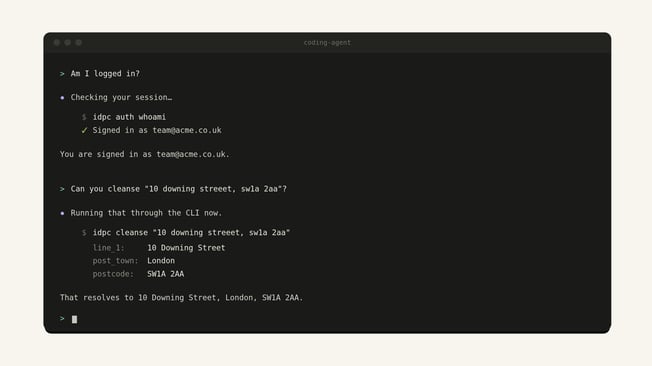
"Am I logged in?" prompts the agent to report back on the current session.
-
"Can you validate the email address email@company.com?" returns the result inline.
-
"Can you cleanse 10 downing street, sw1a 2aa?" hands back the corrected, structured address.
-
Part of a Wider AI-Native Stack
The CLI is one of several tools we have built to make Ideal Postcodes easy to reach from any AI-driven development environment.
Agent Skills focus on the ease of integration. Rather than an agent guessing at authentication patterns or picking the wrong widget for the job, the Skill provides the context needed to do it correctly.
Our llms.txt file provides the full API reference, integration guides, and widget documentation as a single document. It can be pasted into a model's context or wired into a documentation MCP server. Every page of our docs also has a .md version, accessible by appending .md to any URL, which makes it straightforward for agents to fetch just the parts they need.
We built out our Build with AI guides so that anyone using coding agents such as Claude Code, Cursor, Codex, or AI app builders such as Lovable, Replit or base44 have a clear starting point to add address validation to forms.
Getting Started
The full command reference is covered in the CLI documentation. If you are already working with a coding agent, the Build with AI guide is a good next step.